On-site analytics
We've got two great new features launching today, after nearly 4 months of development: heatmaps, and on-site analytics.

On-site analytics is a new feature that embeds a widget on the bottom right corner of your web site automatically to view information about your visitors who are on your web site right now. Don't worry, only you (the site owner) can see it — but if you want to disable it, you can do so on your user preferences page.
This feature is available to all Pro or higher customers. Need to upgrade?
Before we get into the details, a few important notes for this to work properly:
- This requires the latest version of our tracking code, so clear your cache!
- Third party cookies must be enabled (or at least, have Clicky white listed)
- You need to check the "remember me" box when you login to Clicky, so that a cookie is set to remember who you are.
There are three components to on-site analytics:
Visitors online
The "on site" number shows you how many visitors are currently on your web site. Click on it to view a list of said visitors! Up to 8 visitors are shown at a time, and you can page through them with the "next page" link in the top right corner. Click on the username (if you're using custom data tracking) or IP address to view their session on Clicky:
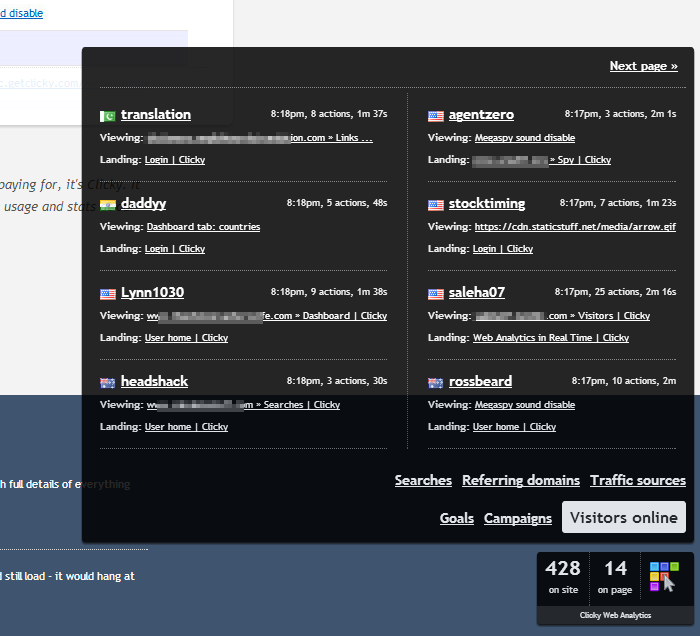
You can also view several summary reports about the visitors onine, such as top searches, referrering domains, traffic sources, goals, and more.

Visitors on this page
The "on page" number represents how many visitors are currently viewing the page that you are currently viewing. Clicking on it shows the exact same type of reports as the global "on site" report, except it's limited to visitors currently viewing the same page that you are.
The "on site" and "on page" numbers will automatically update once per minute for 5 minutes, then once every 5 minutes for an hour, while you are idle on a single page on your web site. But after an hour, the updating will stop.
Heatmaps
If you have enabled heatmap tracking in your site preferences, and there is heatmap data in the last 7 days for the page you are currently viewing, you will see the heatmap icon on the right hand side (large colorful pixels). Click that to view a heatmap report for the page you're viewing for the current date, along with segmentation options for the heatmaps.
There's a lot to talk about with heatmaps, so we wrote a separate post for that. Read about heatmaps here.
Other notes/features
- Clicking on the "Clicky Web Analytics" link will open a new tab/window on getclicky.com with your site's dashboard.
- On-site analytics requires jQuery. We automatically check if your site already has it, and if not, we side-load it from our CDN — after which we call jQuery.noConflict() to ensure we don't interfere with any other libraries you may have on your site that use the $() shortcut. In order for all features to work, we do require at least version 1.6, which is almost 30 months old — if you're on a version older than that, please upgrade 😉
- To authenticate your access to on-site analytics, we had to cache your user cookie on the tracking servers. While we were at it, we went ahead and enabled ignoring your traffic to your own web site automatically, without having to set a IP filter / filter cookie. If you need to test something on your own web site and see it in Clicky, simply logout of Clicky or use a different web browser. We know this will be a PITA for some of you, but the majority of users want to ignore their own traffic so this makes sense for us to implement as a convenience feature.
- Calls to clicky.log() are now stored in a cookie queue (unless you have disabled cookies), to help ensure these calls aren't missed. Previously we recommended calling clicky.pause() manually after any clicky.log() or clicky.goal() event that resulted in a new page view, as otherwise the call would almost never be logged. This new queue system is designed to fix this issue. As long as the visitor's next page view is still on your own web site, the cookie will be seen by our tracking code and processed as an event and sent to our tracking servers upon the next page loading on your web site. The queue is processed every 5 seconds when idle on a page, and immediately upon a fresh page view.
Hope you enjoy!