Major updates to alerts, goals, and spy
We've been working on a gigantic update to alerts, goals, and spy, and here it finally is. The most major update is to alerts, so we're pulling that out of the blackhole that is your site preferences and putting it front and center.
So what's new? Here's what the alert setup page looks like now, which should give you a nice overview of everything that's new:
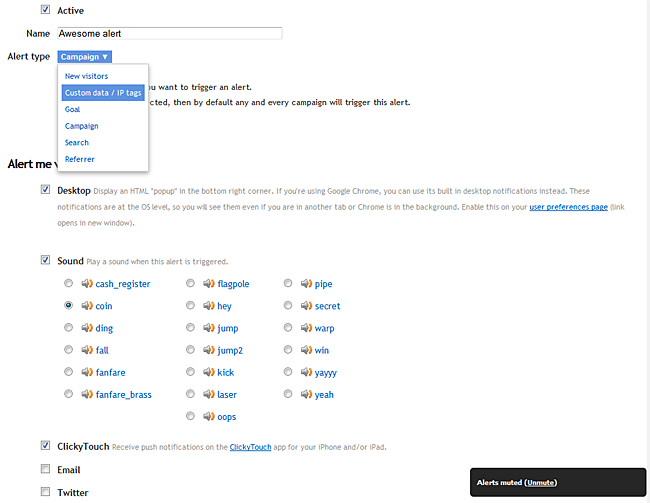
Let's start with the new ways to be notified: Desktop, Sound, and ClickyTouch (our official unofficial iOS app). These are in addition to the previous methods, which are Email and Twitter. Any alert you setup can use any combination of these 5 methods, including all of them, so it would be pretty much impossible to miss an alert if you set it up right!
- Desktop alerts — You may have seen some web apps using Google Chrome notifications (Tweetdeck, Rdio, etc). We explored this option, alongside using jGrowl for other browsers, but I'll be honest: The Chrome notification API is horrible and has very limited options and functionality. It's nice you can see them without having to have the browser in focus, but that's the only nice thing about them. So, jGrowl for all. Desktop alerts will appear in the bottom right corner of your browser window. Here's what they look like:
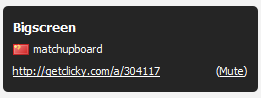 At the top is the alert name. If there's any revenue associated with this alert (from a goal), that will shown on this line too. Next line is brief details about the visitor: country, then IP tag OR custom->username OR organization OR IP address (in that order of preference), then their referrer. The last line is a link to view the session immediately on Clicky. And on the bottom right is a "mute" link, which is handy when you just want some peace and quiet to browse your stats. When alerts are muted, there's a "sticky" box in the bottom right corner informing you of their muted status, with the ability to unmute them.
 - Sound — These add a lot of personality to alerts, and allow you to know an alert has been triggered even when you're looking at another tab or doing something else on your computer. There's a total of about 20 sounds available, including a cash register — perfect for goals where you make money!
- ClickyTouch — The icing on the cake. ClickyTouch is a third party product for iOS that uses our API to give you a nice interface for Clicky on the go. We worked with Steve (the developer) to integrate push alerts into the app. So if you have ClickyTouch installed and check this box for an alert, you can get alerts immediately on your iPhone or iPad, wherever you are. And if you "view" the alert, it will pop open ClickyTouch and show you the visitor session that triggered it.
- Important — to receive alerts on ClickyTouch, you must update to 1.5.2, which was just released in the app store alongside this release.
- Email and Twitter — These are the original alerting methods we've had for over a year and they still work the same way. You can receive alerts via email or Twitter direct message. To get alerts via Twitter, you must be following Clicky on Twitter.
In addition to these new methods of being alerted, we've added two new types of alerts:
- New visitors — This is an extension of new visitor sounds in Spy we added a few weeks back. That method only worked in Spy. This method works no matter what report or page you are viewing. But the option to toggle it on and off is still available in Spy as well. If you enable it via Spy, by default it will only be the traditional "ding" sound. But if you set it up in the alerts area instead (or edit it after enabling via Spy), you can have it do a desktop alert also or instead. To ensure we don't inadvertently hammer third party mail servers and APIs, this alert ONLY works with sound and desktop — the other three options are disabled.
- Custom data / IP tags — We've had countless requests for alerts for when a specific visitor is viewing your site. This is the answer to that. Any visitor that you have "named" with IP tags, you can now create an alert for them. Even better, if you use our custom data tracking API (and if you're not, you're crazy — it's our best feature), then you can trigger an alert for ANY custom data that you add to a visitor session.
I want to talk more about desktop and sound alerts for a minute. To be clear, since these are integrated into the web site itself, these only work when you have our web site open. But if you're anything like us, that's pretty much 24x7, so no biggie, right?
Depending on how many alerts are queued up to show you, they are visible for either 6 seconds or 10 seconds. We only do one at a time though, so as long as there are less than 6 queued up (and 99% of the time, that should be the case, unless you are insane), then they'll be displayed for 10 seconds.
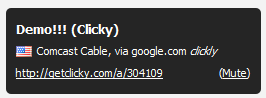
When you are viewing reports for just one specific site (e.g. whenever you're inside the /stats/ directory), you will only receive alerts for that specific site. But if you are anywhere else on the site — user homepage, help, contact, etc — then alerts for ALL of your sites will be active. And in this case, we append the site's name to the end of the alert title, so you know what site it's for:
Goals
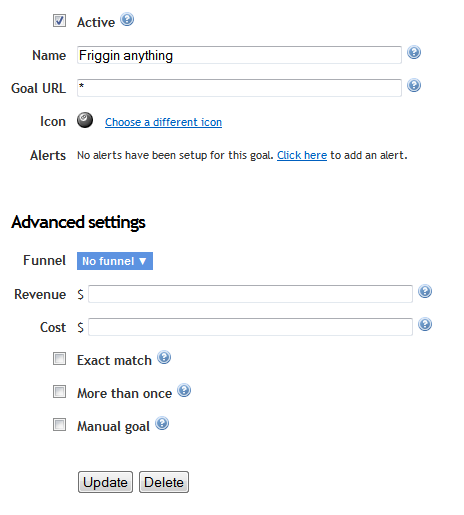
We cleaned up the goal setup page quite a bit, so only the basic options that most of you need are up top, with the rest in the "advanced" section. We now allow "global" wildcards, meaning the entire goal can be just a wildcard. In this case, ANY page view will trigger the goal. You can do the same thing with funnels, as well as search and referrer alerts.
You can also see that we've added a shortcut to create an alert for a goal after you've saved it. This takes you to the alert setup page, with the alert name prepopulated to match the goal name, and the "goal" alert type with the proper goal preselected.
Spy
We spent a LOT of time integrating all of this new alerting into Spy as well. Not many of you know this but Spy is essentially a completely different "product" from the rest of Clicky. It is a true live stream of people browsing your site, whereas the rest of your reports are updated once per minute in batches using this same data. So, to make sure the alerts in Spy were triggered at the exact same time you see a visitor performing something in Spy that should trigger an alert, we had to write another entirely new version of the whole alerting system in Javascript — just for Spy.
We thought it would be quite nice to actually highlight the goals in Spy as well. As you can see here, the row is highlighted, and the goal icon you chose is on the right hand side:
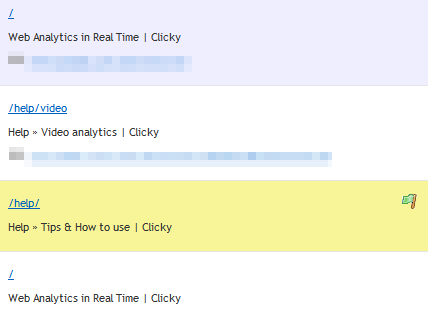
Desktop and sound alerts work the exact same way here as they do in the rest of Clicky.
What about Bigscreen?
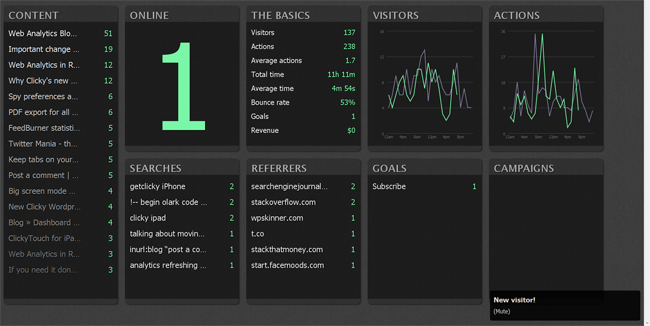
You don't think we'd leave one of our newest most popular features high and dry, do you? That's right, alerts even work in Bigscreen, as you can see below. We made the fonts extra big so you could read them from afar. The alert visible here is the new "new visitor" alert mentioned above.
We've tested this very thoroughly but we do expect there to be some minor bugs, especially with the Spy stuff. So let us know if something doesn't work like you expect it to.
Last, when creating alerts, there's up to a 30 minute delay before they are fully active within the system, so be patient — and enjoy!
Update
Yes, there were some bugs. Just pushed an update that fixes them. Changes:
- FIXED: Spy was showing URL instead of Title in the top right content box
- FIXED: "Unmute" alert box was MIA because of last minute change to the way it works that wasn't fully tested before deploy
- FIXED: global alert bombardment when leaving /stats/ — now, all alerts are "reset" when you go to a non-stats page so you'll only get new ones that occur from that point onward.
- FIXED: clicking an alert URL was supposed to load via Ajax, but was not because of, well, it was dumb let's just leave it at that.
- FIXED: Minor goal processing bugs in Spy
- NEW FEATURE! You can use wildcards in the custom data alert type, including a "global" wildcard "*" to match a visitor with that variable of ANY value, e.g. username=ANYTHING.