Clicky vs. Google Analytics (GA4)
Google Analytics may be a powerhouse for enterprise-level data modeling and complex cross-platform attribution, but that comes with a significant investment in time, configuration, and technical knowledge. Tack on the long data processing delays, and Google's gargantuan conflicts of interest when it comes to visitor privacy, and you'll find that many site owners are looking for GA4 alternatives.
Clicky, on the other hand, focuses on simplicity, privacy, and real-time data. Shall we compare?
| Clicky | Google Analytics 4 | |
|---|---|---|
| Setup Time | A few minutes | A few hours, to a few days |
| Real-Time Data | Instant | 24 hour delay (most reports) |
| Visitor Privacy | GDPR-compliant by default | 😂 |
| Data Accuracy | High (Resistant to Ad Blockers) | Low (literally the most blocked javascript file on the planet) |
| Interface | Simple & intuitive | Complex & confusing |
| Heatmaps | Native & Segmentable | Not available |
Setup time
Google Analytics' target audience is large ecommerce sites. Chances are, this is not you. But either you spend literal days configuring GA4 for conversions, cross-site attributions, third party integrations, etc, or you might as well not be using it.
Clicky on the other hand is useful from the start. A few optional features may require configuration, but you'll be getting your money's worth immediately.
Real-time data
When you launch a new campaign, you want to know if it's working now.
In GA4, standard reports often have a processing delay of 24 hours. While there are a few "Real-time" sections, they are highly limited. It’s a quick pulse check, not a diagnostic tool.
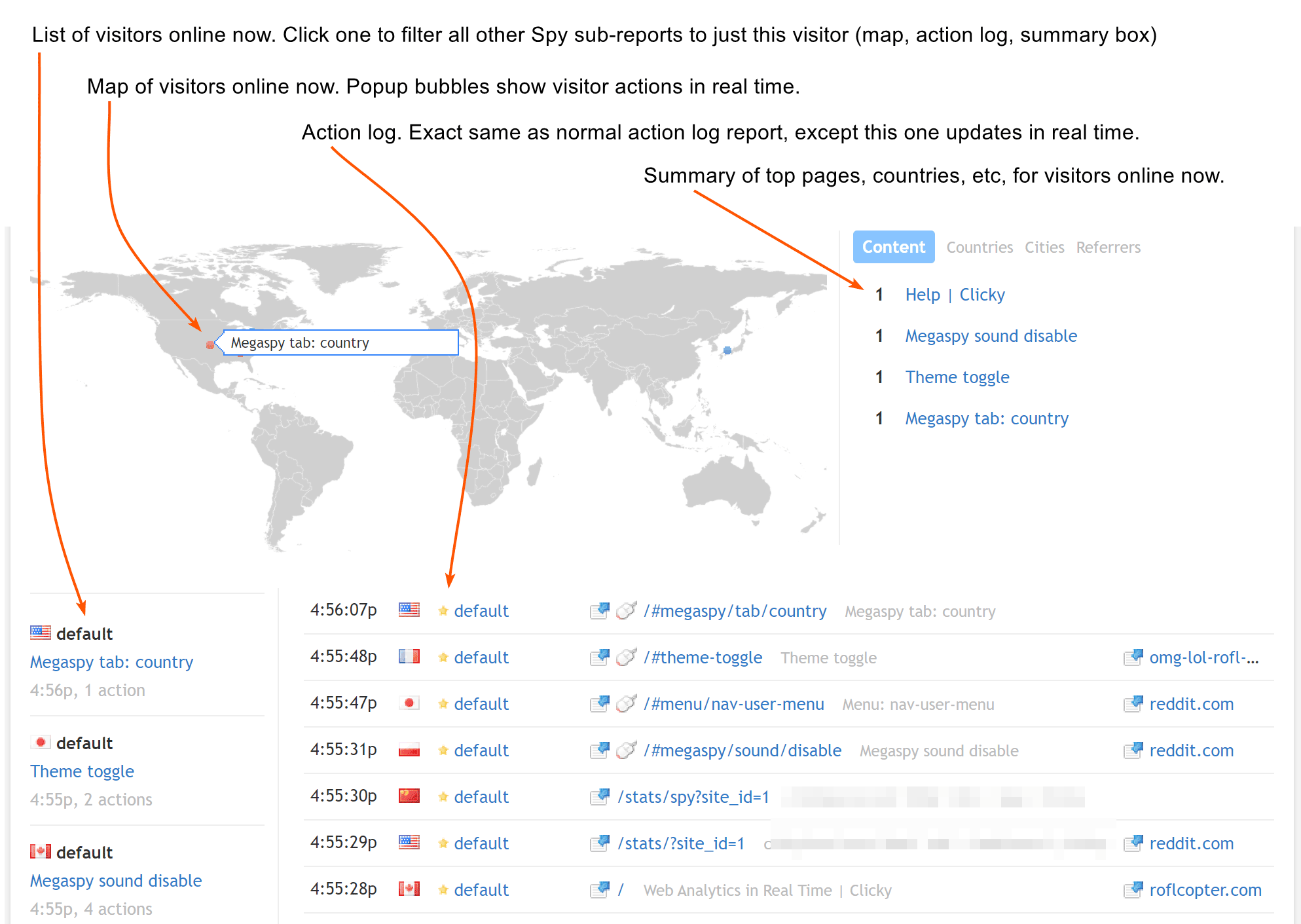
Clicky provides real-time visitor logs and action logs. You can see every visitor, every page view, and every click as it happens. This is invaluable for:
- Troubleshooting: Is that new button actually working?
- Campaign Launches: Monitor traffic spikes and conversions in real-time.
- User Behavior: Watch how people move through your site the moment they arrive.
Visitor privacy
GA4 is "privacy-neutral," which is a polite way of saying it's up to you to configure consent modes, IP anonymization, and restricted data processing to meet relevant laws (GDPR, etc). If you get it wrong, the liability is yours.
Clicky's privacy-friendly web analytics is the default. This means no cookies and no personal data tracking by default, so you can get on with your life. No cookies or personal data also means no consent banners.
Data accuracy
Most people install adblockers to block ads, but most of them block trackers too, even privacy-friendly ones like Clicky. But ga.js is also blocked manually by millions of people on millions of devices, making it the most blocked javascript file on the entire planet. Your traffic data will simply not be accurate.
Clicky has an official tracking method to track adblock visitors. This works by proxying all beacons through your website's domain name, so the browser sees them all as first party requests.
If you care at all about accuracy, this is the most accurate third-party tracking method by far, and you will not get it with Google Analytics.
Interface
GA4 is powerful, but it's also notoriously difficult to use. To get even basic information, users often have to navigate through multiple layers of "cards," "dimensions," and "customizations."
Clicky focuses on simplicity. The dashboard is clean, but still manages to show all relevant information up front. It can also be customized should you so desire.
Clicky’s visitor filtering (segmentation) system is built for humans. Just click any item in any report, and you will immediately see a summary of those visitors, as well as the list of visitor sessions below that. No confusing menus to use or anything like that!
Feature Deep Dive: What Clicky Brings to the Table
GA4 has a massive suite of features, but the majority of them are rarely used outside of large ecommerce sites.
Clicky offers features that you'll actually use:
1. Real-time visitors and actions
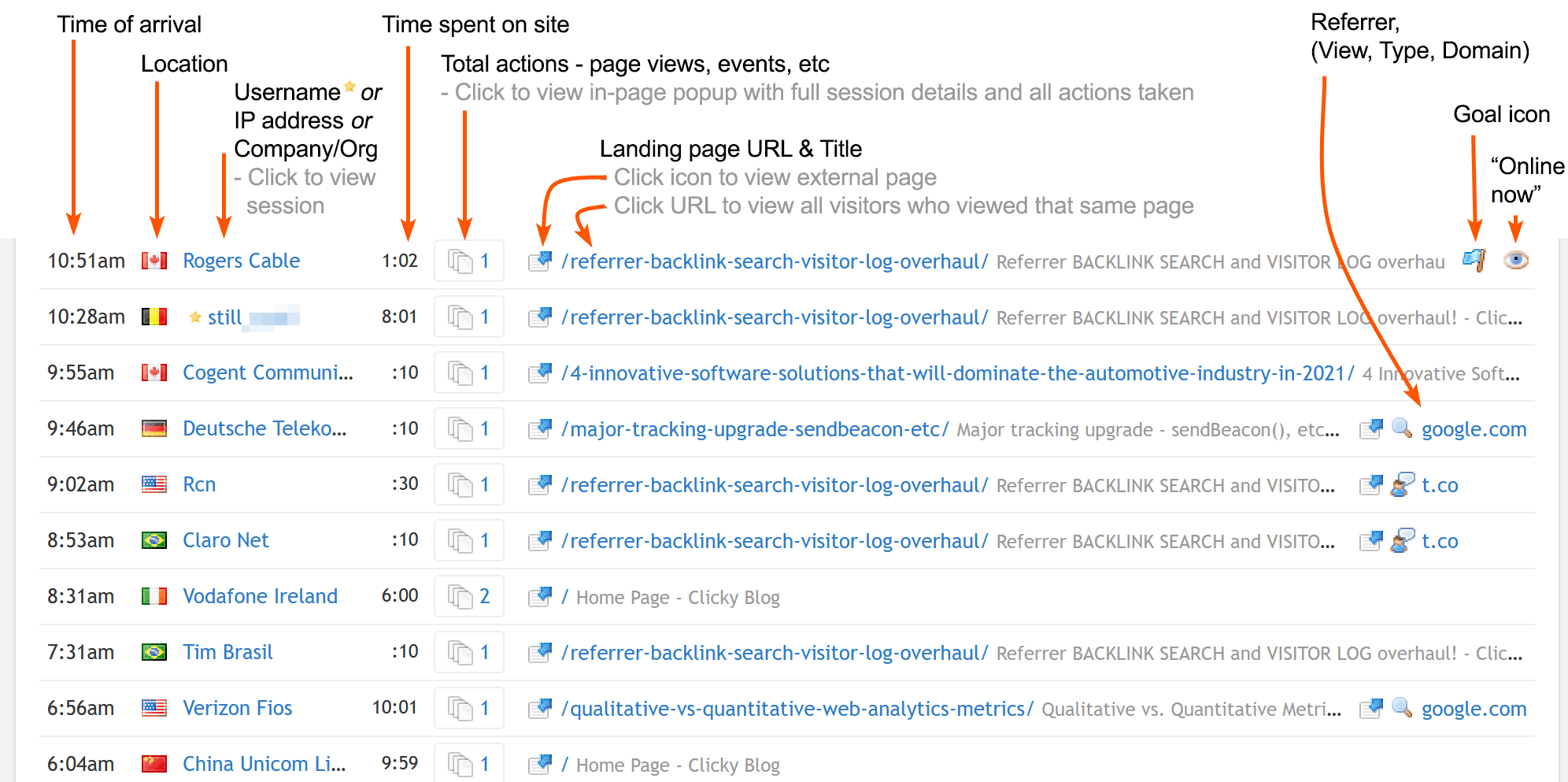
Clicky provides a comprehensive, reverse-chronological log of every visitor who lands on your site, but anonymized and privacy-friendly by default. Unlike GA4, which shows aggregates data only, Clicky lets you see exactly what each individual visitor is doing, from their referrer and landing page, to their country and browser.
This level of granularity is essential for understanding the "why" behind your traffic. If a specific page has a high bounce rate, you can look at the visitor logs to see where those people came from and what they did before leaving.
2. Native Heatmaps
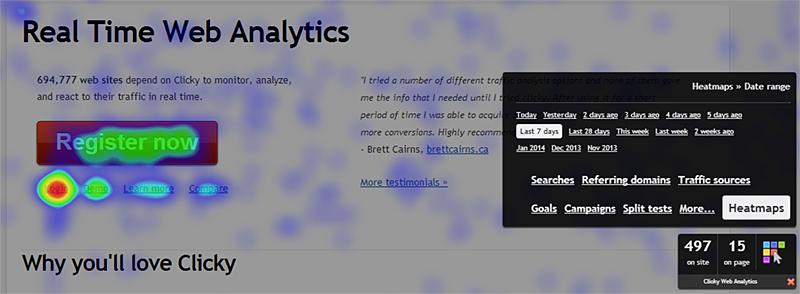
Seeing where your visitors click, either individually or in aggregate, is some insanely useful data. But you won't find any of that in GA4!
Lucky for you, Clicky has heatmaps, and they can be viewed on a per-page or per-session basis.
Clicky also lets you segment heatmaps, so you can see just the specific group of visitors you want.
3. Uptime Monitoring
Is your site offline? Google won't bother to tell you, but Clicky will! Our built-in website uptime monitoring ensures that you're alerted the second your site goes down, so you can fix it before your customers notice.
4. AI web analytics
Our AI Web Analytics features tags visitors from AI chatbots and domains for easy analysis.
And coming later in 2026: direct AI bot tracking.
Summary comparison table
| Clicky | Google Analytics 4 | |
|---|---|---|
| Setup Time | A few minutes | A few hours, to a few days |
| Real-Time Data | Instant | 24 hour delay (most reports) |
| Privacy | GDPR-compliant by default | 😂 |
| Data Accuracy | High (Resistant to Ad Blockers) | Low (literally the most blocked javascript file on the planet) |
| Interface | Simple & intuitive | Complex & confusing |
| Heatmaps | Native & Segmentable | Not available |
Which tool is right for you?
The "best" tool is the one you actually use.
GA4 is for you if: You are a large enterprise with a dedicated data team, you need complex cross-platform attribution, and you have the resources to spend weeks (or months) mastering a complex data model. There's a 99% chance this is not you.
Clicky is for you if: You are a founder, a marketer, or website operator who needs accurate, actionable data now. If you want to see your traffic in real-time, understand user behavior with heatmaps, and stay compliant without the headache of complex configurations, Clicky is the clear winner.
Looking for more options? Check out our guide on the Best Google Analytics Alternatives in 2026.
Stop fighting with your analytics, and start using them.