Twitter Mania — the best update we've ever released
If you are a Twitter user, or at least understand the value of the data that's available from their real time search engine, this update should blow you away.
We use Twitter to heavily monitor what our competitors are saying, and what other people are saying about them. Amongst other things. You can get any search result from Twitter via RSS, which is handy, but it's just a raw stream. I've wanted to summarize this data for a while now so I had it all in one place and could easily sort through it. I'm not a fan of any of the tools currently available, so I decided to bake one right into Clicky.
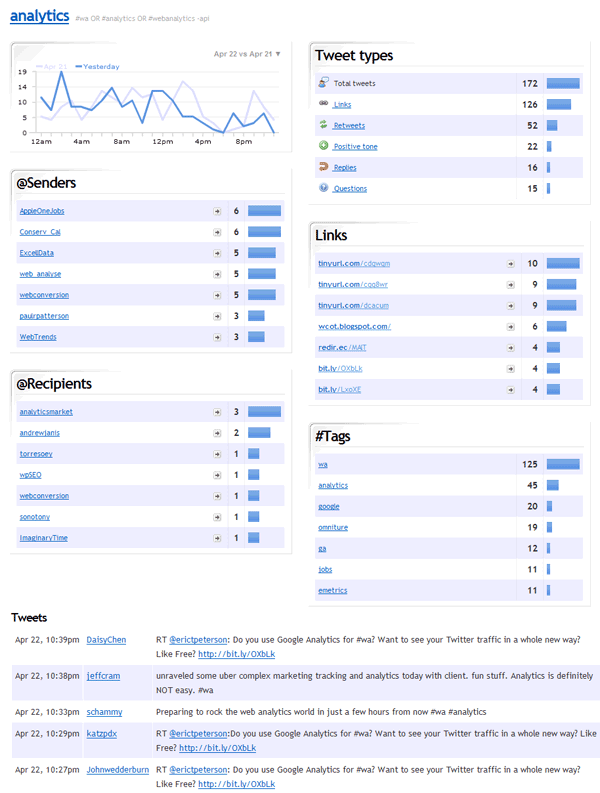
Twitter brand monitor
Hence, Twitter brand monitor is born. I don't think much explanation is needed. Everything in the familiar dashboard boxes summarizes all of the Tweets at the bottom, and clicking on any of them will filter the Tweets by that criteria. You don't need to run a business or have "competitors" to find this tool useful. Use it to monitor any topic you want!
Alerts!
One feature request we get quite a bit is some kind of alert system. The typical alert system is via email. Boring! I mean sure, we did that, but we also took it a step further and can send you alerts straight to your Twitter account. (You will need to follow getclicky to receive alerts, however, as they are sent via Direct Message). We use the shortest links possible to link you straight to the session ID for this visitor, so they fit perfectly within the 140 char limit.
The alert system is fairly basic right now (you can only setup alerts for searches, referrers, goals, and campaigns) but we plan to add more options in the near future. Namely, alerts on tweets, custom data, downloads, outbound links, and page views. You can setup alerts in your site preferences.

Hourly data
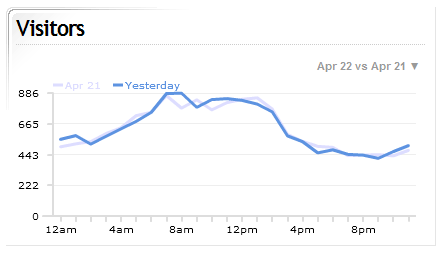
One thing you may have noticed from the first screenshot is hourly data. Yes, we are now tracking hourly figures for certain types of data: visitors, actions, and tweets. This has been a huge request as well. Any time you are viewing a single date, and the data you are viewing supports hourly data, it will default to showing you that date, as well as the day before for comparison's sake.
UPDATE There is now a dashboard preference to disable showing hourly data by default. I think defaulting to hourly data makes sense for most people though, since Clicky is more about the "right now" than anything else.
Other tidbits
- Twitter monitor is a Pro-only feature. It sucks up a lot of bandwidth and space, analyzing and storing all of those Tweets. Alerts are currently Pro-only as well although we do want to offer that to everyone. We're going to be monitoring the alert system to make sure its resource usage isn't too high. If all seems well, we'll release it to everyone. Currently, any alert will max out at 100 per day, as we don't want to spam Twitter or your email servers.
- The Twitter monitor has a dashboard module as well, although it only shows you the total values for each search you have setup. You have to click through to each of them to see all the details. This basic data is also available via the API (type=tweets) and email reports.
- There was a bug with the API that was returning the incorrect "unixtime" value. This has been fixed. Your application may require an update if you were relying on this value.
- Many of you informed us of this post on the Google Analytics blog. They are messing with referring URLs again. We've already implemented a fix. Hopefully you won't be seeing many more referrals from just "http://google.com" anymore.
- Replying to Tweets directly from Clicky — this will be coming soon. It didn't make it into the initial release.
- When viewing your Twitter search results, keep in mind that the summary data is only for the date you are looking at, which defaults to today. So if the search you have setup is fairly low traffic (e.g. averages just a few hits a day), changing the view to 7 days or 30 days will give you a better overall view of activity.
UPDATE Reply and Retweet icons have been added in the tweets list, next to each one. However these simply link to Twitter.com with the appropriate params to do as requested. A future release, we'd like to integrate that directly into our service.
Also, when viewing one of your searches, if there are more than 100 tweets, you can now view "next page". I don't know how I managed to leave that off the initial release 🙂