How to check website traffic
When people ask how to check website traffic, they are usually asking one of two very different questions:
First, there are the website owners who want to know how many visitors are actually showing up. They may have just launched something, or perhaps finally realized they've been flying blind for months.
Second, there are the curious ones. You might be a competitor wanting to see if that new guy in your niche is actually gaining traction, or a marketer trying to benchmark your own success against an industry leader.
These two groups require completely different methods, which we'll cover below.
Checking your own website's traffic
If you are looking to check your own website's traffic, then you have to be the one doing the tracking.
You cannot "check" your traffic from the outside. There is no magic window into a server that tells you how many people visited without you having installed something to listen for those visits in the first place. To get accurate data, you need to install a web analytics service.
How it actually works
At its most basic level, most web analytics services work via a small snippet of JavaScript code that executes in a visitor's browser when they visit your webste. It gathers a handful of technical details (the URL they are on, how they got there (the referrer), what kind of device they are using, etc), and then sends that information back to an analytics server.
When you log into your dashboard, you aren't looking at a live feed of the internet; you are looking at a processed history of all those little signals your code has been collecting for your website.
Getting started with tracking
If you want to see who is on your website right now and get real-time, actionable data without the headache of complex configurations or privacy nightmares, register for Clicky here. We've spent nearly two decades making sure that when you look at your dashboard, the numbers actually mean something.
Most modern services, including Clicky, make it as simple as copying a block of code and pasting it into the <head> section of your website template. Or if you use a CMS like WordPress, there are likely web analytics plugins that handle this for you.
The best web analytics services will even offer server-side tracking and reverse proxy tracking, ensuring that your data is as accurate as possible.
Once installed, you'll realize that "traffic" is actually a collection of different metrics that people often confuse.
The metrics that matter
Once you have an analytics tool running, don't get distracted by all the shiny vanity metrics. Focus on these to start with, until you become more familiar and comfortable with your tool of choice:
- Unique Visitors: This is the number of individual people who came to your site. If one person visits your homepage ten times in an hour, they are still just one visitor.
- Pages/Content: This shows you your most popular content and how many times each one was viewed.
- Referrers: This tells you where your traffic is coming from. Did they find you on Google? Did they click a link in a newsletter? Or did they come from a random site you've never heard of? Understanding this is the difference between knowing that people are coming and knowing why they are coming.
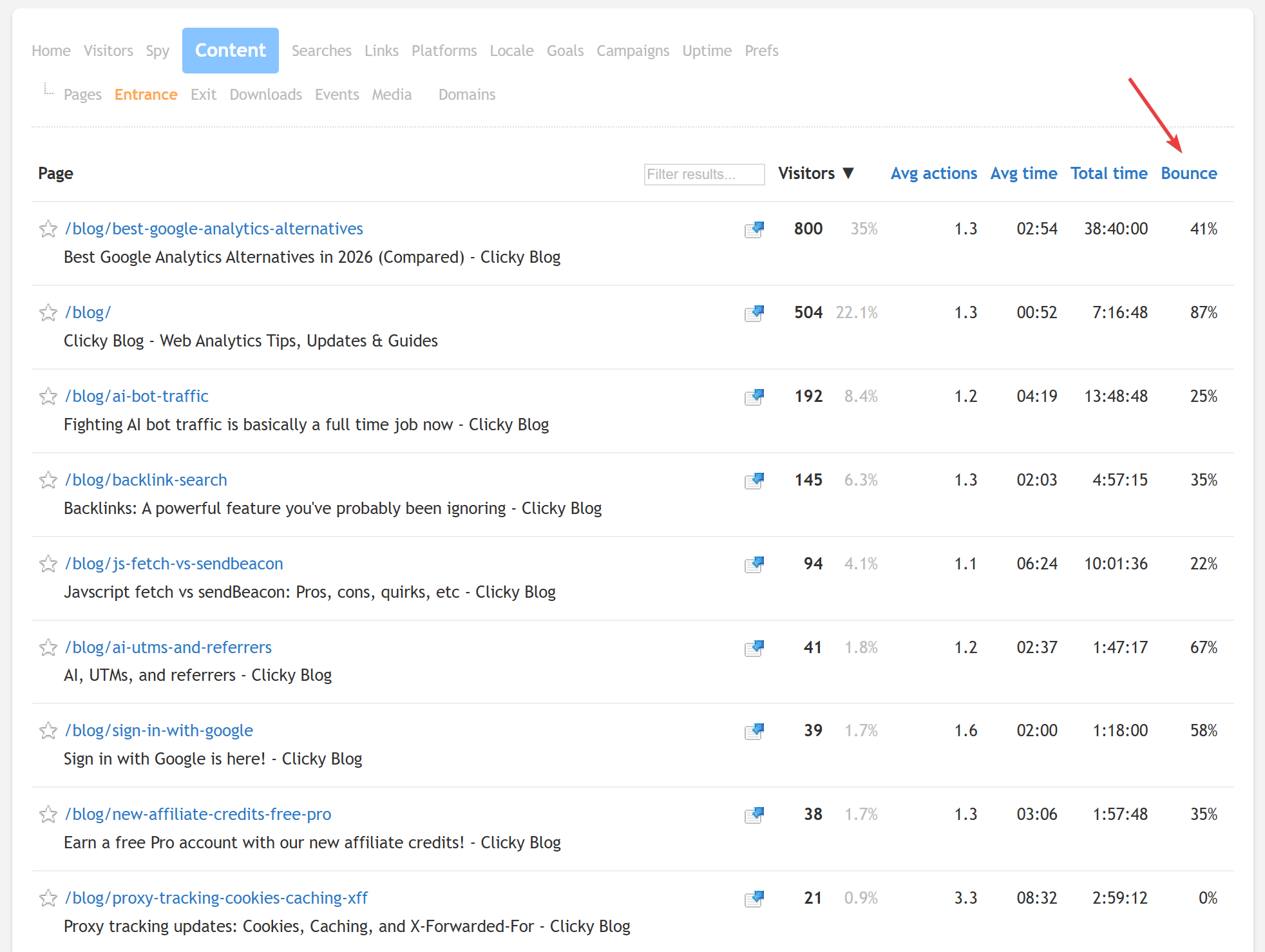
- Landing page bounces: Landing pages show you the first page viewed for each of your visitor sessions. Bounce rate shows you how many people left quickly without engaging. Combined together in one report, like Clicky does below, makes for a powerful way to find your "SEO Powerhouses" (highly engaging content) and your "Leaky Buckets" (pages that need work to keep visitors longer)
Checking someone else's traffic
Now, let's talk about the other group: the people who want to peek behind the curtain of a site they don't own.
If you want to see how much traffic competitor.com is getting, you can't just install code on their server. You have to rely on third-party estimation tools like SimilarWeb, SEMrush, or Ahrefs.
The truth about estimates
These tools don't have access to the competitor's server logs. Instead, they use several different methods to estimate or "model" what the traffic probably looks like. This usually involves:
- Large-scale user panels: They track a massive group of real people who have agreed to share their browsing data (often through browser extensions or free apps).
- ISP and crawler data: They ingest massive amounts of data from internet service providers and web crawlers to see patterns in how traffic moves across the web.
- Mathematical modeling: They take the known data points and use complex algorithms to fill in the gaps for the rest of the internet.
Why these estimates can be wrong
Because these tools are building a mathematical model, they are prone to significant errors.
If a website has very low traffic—say, a niche blog with 500 visitors a month—an estimation tool might report it as having zero traffic, or it might wildly overstate it because of a small anomaly in their panel data. These tools work best on high-traffic sites where the statistical patterns are much clearer.
Furthermore, these tools struggle with "dark" traffic. If a lot of a competitor's traffic comes from private messaging apps (like WhatsApp or Slack), email clients, or direct links that don't pass referrer data, the estimation tools will often miss it entirely or miscategorize it.
When to use them anyway
Even though they aren't 100% accurate, these tools are still incredibly useful for high-level strategy. You shouldn't use them to decide exactly how much to spend on a specific ad campaign, but you can use them to:
- Identify trends: Is your competitor growing or shrinking over the last six months? Even if the absolute numbers are off, the direction of the line is usually correct.
- Discover referral sources: If an estimation tool shows that a competitor is getting massive traffic from a specific niche forum, that's a huge hint for your own marketing strategy.
- Benchmark your industry: You can get a general sense of what "normal" looks like in your space.
In short: use them to find the "where" and the "how," but don't bet your business on the "exactly how many."
Summary: Accuracy vs. Scope
| Feature | Your Own Site (Analytics) | Someone Else's Site (Estimators) |
|---|---|---|
| Accuracy | Extremely High | Estimated / Variable |
| Data Type | Real-time, granular truth | Historical models and trends |
| Setup Required | Yes (Install code) | No (Just search the URL) |
| Best Use Case | Optimizing your own growth | Competitive research & benchmarking |
Final thoughts
Checking website traffic is either a task of technical implementation or one of statistical interpretation.
The data is sitting there, waiting for you to collect it, so stop guessing and start measuring. If you want a tool that stays out of your way and gives you the truth about your visitors, sign up for Clicky today.
If you're just looking at competitors, keep your expectations in check. Use those tools to find patterns and opportunities, but remember that you're looking at a map, not the actual terrain. Stay curious, but stay skeptical of the numbers.