Google Chrome widget (Clicky Monitor) Web Analytics Plugin
⬅️ Back to all plugins
💾 Download plugin
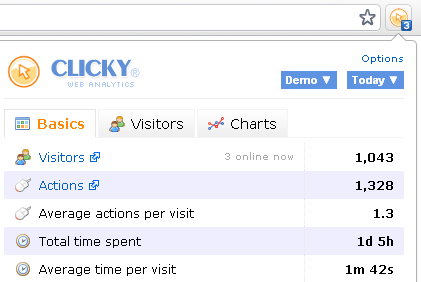
- Import all your sites automatically from Clicky, or add them manually if you prefer. Select which one you'd like to actively monitor from the site dropdown menu in the ClickyChrome popup.
- The toolbar icon will display either the number of visitors currently online, total number of visitors today, or total number of completed goals today. The data is refreshed every minute so you'll always be up to speed.
- From within the ClickyChrome popup, you can view basic site stats for various date ranges, see comprehensive information about your site's last 5 visitors, and display graphs for visitors, actions and top browsers over the past 30 days.
- Using HTML5 desktop notifications, you can chose to be alerted whenever a visitor completes a goal on the site you're currently monitoring.
- If you are browsing your site and would like to see the stats for that particular page, just right-click and select "View page stats", and that will take you to the Clicky stats page for the URL you are currently viewing.
📢 Experience web analytics the way they should be
Sign up for Clicky now and transform your analytics
 0 online
0 visitors
0 actions
0 online
0 visitors
0 actions


